
Observing runs
After this page you can follow a live run without polling in a loop, list and inspect runs by id, read a finished run's result, use the dashboard and its keys, and fix a terminal that cannot draw the status glyphs.
The 0.35 dashboard layout
The dashboard keeps the same evidence sources while making the primary pages quicker to scan. Run, phase, Home, Runs, Stats, and Step summary durations use minutes.active: the union of the run's attempt intervals, so overlapping work counts once and idle time counts never. minutes.span (first start to last finish) is retained as a secondary fact; the Run page may show it alongside active minutes. A timeline attempt row uses that attempt's own clock; pool worker-minutes still sums all attempt clocks.
The pages are arranged as follows.
| Page | 0.35.1 view |
|---|---|
| Home | Today leads with at most three cards: active runs first, then the most recently finished. Each card shows the run name, project, execution status, independent verdict, active minutes, steps done/total, and the API/subscription money pair. From 120 columns the three cards sit side by side; up to 159 columns the plain-word licence block (pool · worker-minutes · weekly share · API · subscription, one row per pool) follows beneath them at full width, and from 160 columns it moves to the right of the cards and shares their rows. Below 120 the cards stack full width with the licence block beneath. Below budget · this week, ── last 7 days ── (Last 30 days/All time cycle with p) charts spend per day beside the by-pool/by-model/by-project lists with Workflows/verified, Favourite pool/model, Spent, Median run and Busiest project, and ── recent ── history › lists the five newest runs; Running and Budget remain visible. |
| Runs | The full run list lives here. Home's compact cards do not replace the active and history records on Runs. |
| Run | The header says done of total steps, names running/waiting ids, and shows active of span minutes plus the start/finish clock. The plan is phase-only boxes on desktop (named step groups, never Parallel work) and a glyph strip on phones; p toggles the phone boxes. The live block is the selected running attempt's latest stream turn (or the last finished turn). Its title labels the applied reasoning and the routing tier (reasoning high · tier medium) and lists that step's stored not-done items. The spend block reports known API/plan subtotals with measured, estimated, running, and unmeasured coverage. The timeline has one phase rule with start → end, active duration and done/total, then one clock · glyph · step · pool · model · reasoning <applied> · tier <effort> row per attempt; a narrow row keeps tier <effort> and drops the model and reasoning. The selected attempt lists its stored not-done items under that row, clipped to the width; a collapsed row keeps the count only (returned early · N not done). Filler started/completed rows, licence bars, so far, and ETA rows are gone. |
| Step | One header, then turns, result, task and cost. Line 1 of the header is the verdict (step · run · status · independent verification · attempt), line 2 the purpose, line 3 pool · model · effort · reasoning beside one clock. Each stored not-done item is its own line under that, then the route sentence. At 160 columns the activity holds the left column and the result, task and cost cards stack on the right; below that the page stacks result → activity → task → cost. |
The Step activity heading carries one visible overview · detail toggle, straight after the heading word (── activity · overview · detail · 9 turns …); the current view is marked. Click either word or press v. The footer says v detail (every turn in full) in overview and v overview (latest turns) in detail, and standalone tasks use the same page.
Overview opens on the newest ten turns at desktop width and newest five below 100 columns, newest at the bottom and selected. One dim line above the window summarizes every earlier turn, for example turns 1–48 · 312 commands · 20 edits · click for detail; click it or select it and press Enter to open the transcript at the top. While following a running step the window slides as turns arrive. Once you move, it stays put and names newer turns below it; f follows again. Rows use only non-zero connector-declared counts: commands, files read, searches, edits, other tools and errors. Click a turn head or press Enter to expand it.
Detail is the transcript: every turn in order and expanded, with the response text in full and then each command or tool call as clock · kind · summary. The page scrolls normally. Select a turn head or tool row and press Enter (or click a transcript row) to open every capture behind it: ids, provider time, duration, usage, parent/subagent, arguments, result and summary. Progress and completion captures with one call id share one row, so every capture stays reachable without counting an operation twice. t filters the transcript; tools keeps turns with tools and errors keeps error rows and their turns.
An individual bullswarm run task uses the same Step model and view through a task-record adapter. It has the same header, blocks, v toggle, turn expansion, footer hints, and activity controls. The adapter preserves recorded identity, project, lane, pool, model, timestamps, status, reason, and task/output paths; it does not invent effort, usage, money, verification, a result envelope, or an event stream. With no stream pointer it says no event stream path recorded.
For integrations, workflow action show <run> <step> --json and workflow task show <taskId> --json expose compact Step schema v2. Display rows are under step.presentation; activity-bearing attempt summaries are under step.attempts, with the complete durable records still in the outer attempts and the selected ordinal in step.selectedAttemptOrdinal. Each attempt keeps one canonical activity.events array, and its turns point into that array with eventIndices. Reference markers use { "sameAs": "attempts[…]" } rather than expanding an identical selected attempt or activity again.
Colours
The Step and Run pages use colour for one thing only: telling you what a word is, not decorating it. Green is work that went well — ✓, succeeded, verified, completed. Amber is work happening right now — ▶, ●, running, the spinner, following ●. Red is work that failed — ✗, failed, interrupted, and an error count above zero. Dim is the supporting detail: when (clocks and dates), how much (counts and token classes), how we know (OpenAI rate card, 20 Sep, no meter reading for this attempt), the row labels, the block rule dashes, the footer hints, and anything still pending (○, waiting). Bold is what the thing is and how much it cost — the step or task name, the run's short id, and every money amount. Each pool is drawn in its own colour, the same colour its bar has on Home, wherever it appears: the pool · model · effort row, the attempt mix, the spend split, the timeline. Everything else — the agent's own response text, the task text, report lines and command text — is left plain, and the selected row is drawn inverse.
If your terminal cannot draw the status glyphs (see Glyphs in your terminal), the pages fall back to ASCII and only bold, dim and inverse remain, so nothing is lost, only recoloured. The exact rules are in the design records under docs/design/tidy-0.35.1/step-v2/README.md and run-v2/README.md, and the rendered frames with their escape codes kept are in docs/design/tidy-0.35.1/frames/colour/ if you want to grep for a colour.
The dashboard
The dashboard is Bullswarm's main screen once setup is complete. Bare bullswarm opens Home; bullswarm --setup or bullswarm setup opens setup; bullswarm workflow tui is the explicit dashboard command. Pass a run id to open that run directly.
# the main screen after setup
bullswarm

# return to the setup control centre
bullswarm --setup
bullswarm setup

# explicit dashboard forms
bullswarm workflow tui
bullswarm workflow tui ab12cd
Every page has a sticky header and a sticky bottom nav. The tab row is five tabs — Home, Runs, Budget, Stats, Fleet — and opens the page directly; Run and Step mark Runs, and Help appears in the row only while it is open. The Run page's footer is local: [ back ] [ ● 1.<shortId> ] followed by Enter open step · p plan boxes · Space follow · ? help; other pages keep run buttons and the narrow-layout [Top] [End] [?.Help] tail visible. A long body shows its first–last/total row window while it scrolls. The dashboard's Help page (?) prints the same page and key map.
The pages answer different questions:
| Page | What it answers |
|---|---|
| Home | What happened today, which top runs are verified, what API-equivalent/licence figures are available, and which workflows are active or recent? |
| Runs | Which workflows are active or in the catalogue, in one active block above the History day table? / filters and a switches active/all; the agents and run it blocks moved to Help (?). |
| Run | Where is this workflow in its compact phase plan, what is each attempt's pool, model, applied reasoning and tier, and what are the current active and span durations? |
| Step | What is this action doing — its header, turn activity, result, task, and cost, with model, effort, and active duration? |
| Budget | What does each pool's quota window report, how much measured worker time is workflows versus rest, what money is measured or labelled, how many median runs fit, and which workflows used the most worker-minutes? |
| Stats | How do runs, spend, worker-minutes, and verification trend over 7 days, 30 days, or all time? Its four tabs are Spending, Pool, Model, and Project. Spending puts the dated chart beside four breakdown panels; By Pool / By Model changes both the chart stacks and the visible breakdowns. |
| Fleet | Which model and reasoning rung each pool uses by lane or provider, its run record and meter state, and where to open setup for edits. |
| Help | What every key, click, layout rule, and dashboard command does. |
Home
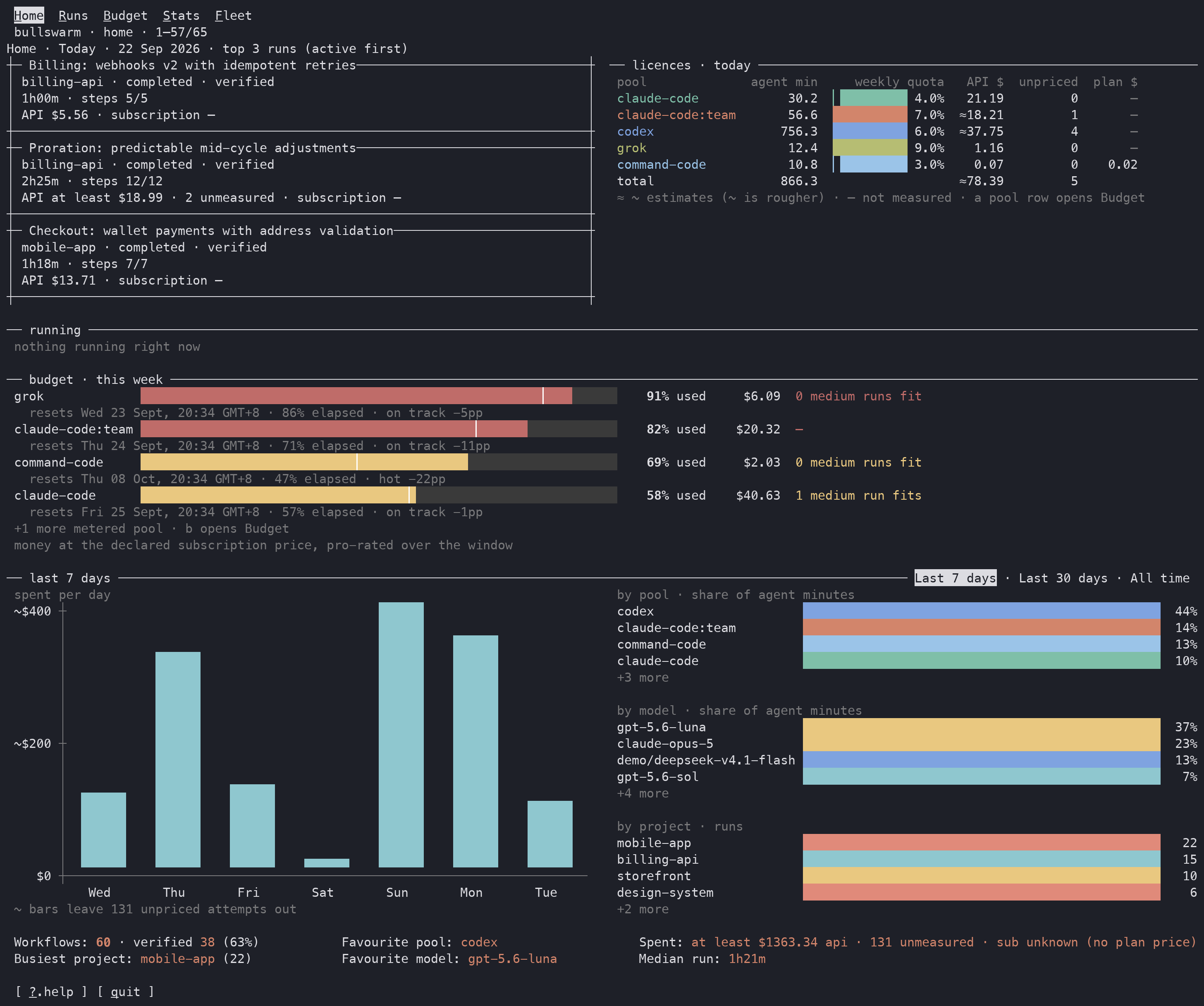
Home answers “what needs attention now?” before you open an individual run.
Runs
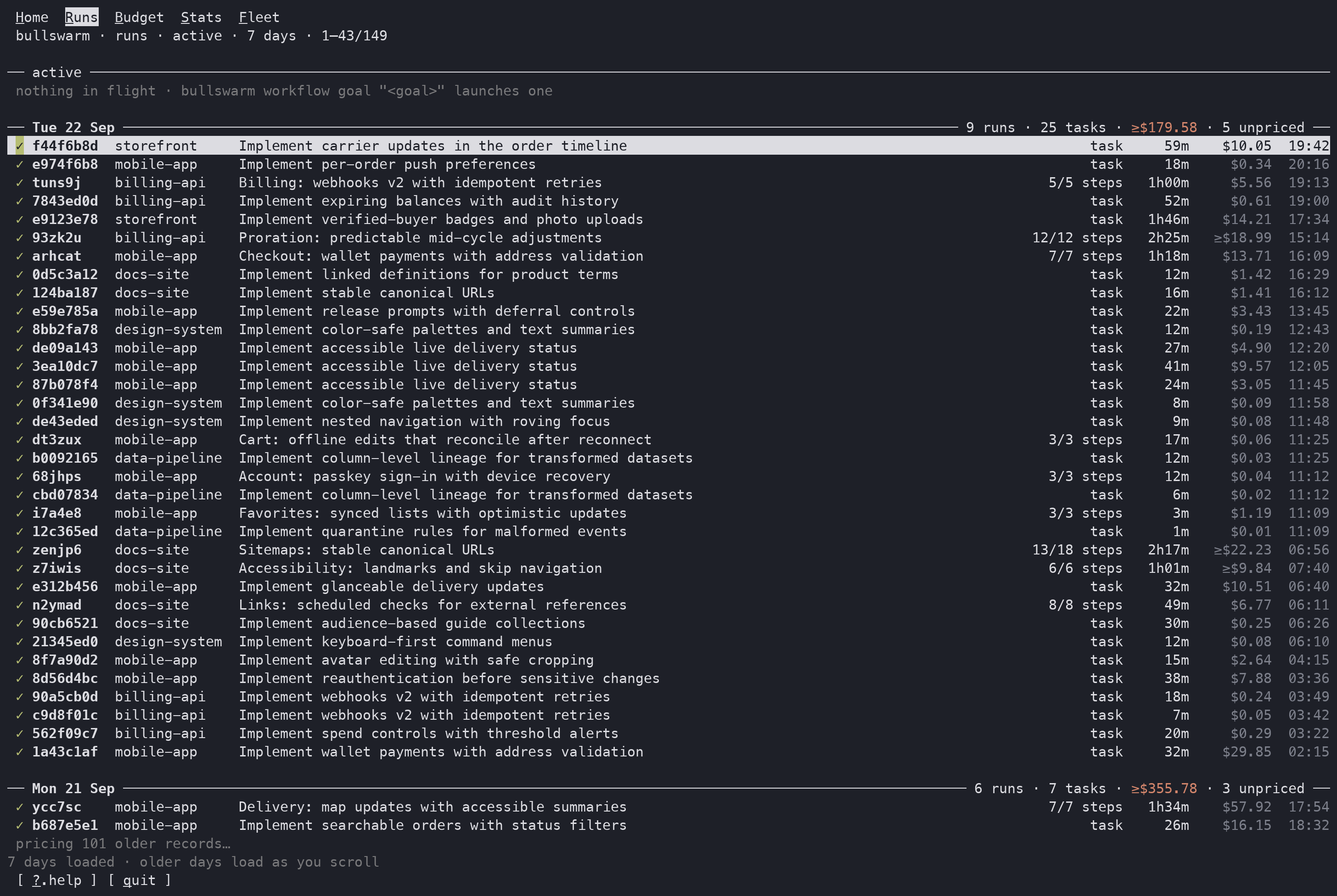
Runs keeps active work above the searchable history catalogue.
Run
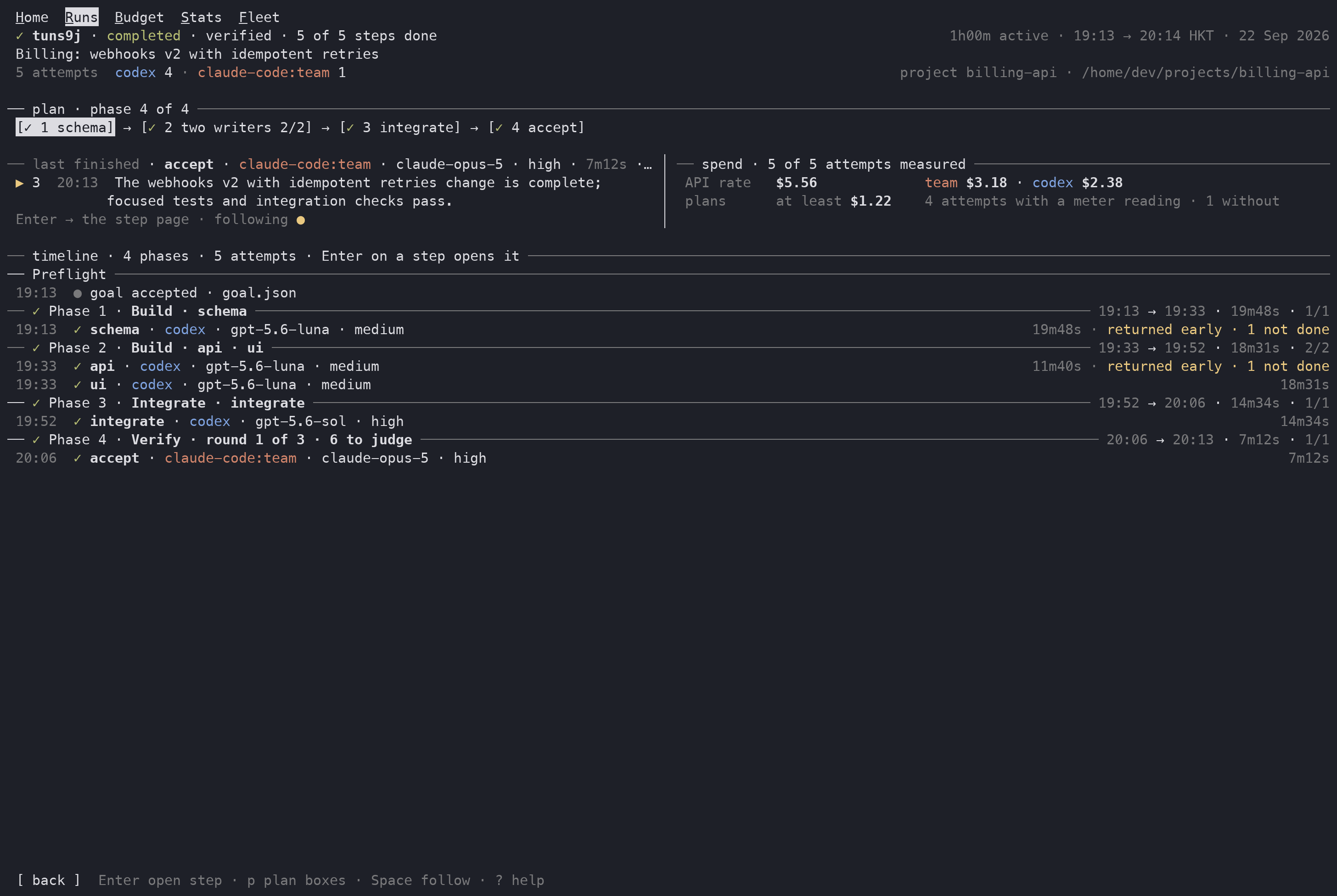
Run separates execution progress from independent verification and shows the pool, model, applied reasoning, tier, and clock for every attempt.
Step
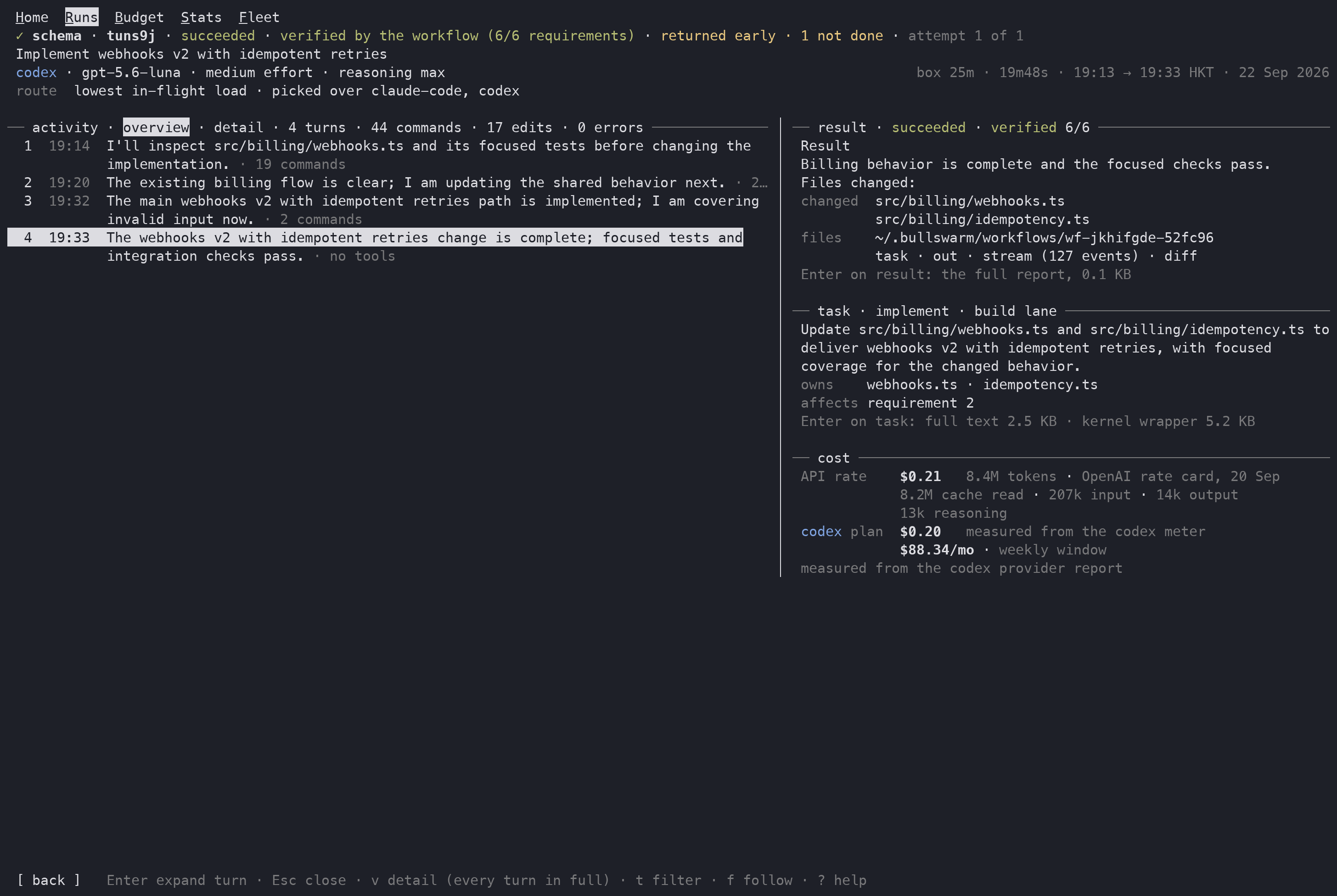
Step is the evidence view: inspect turns, the durable result, the original task, and the cost basis without leaving the dashboard.
Stats
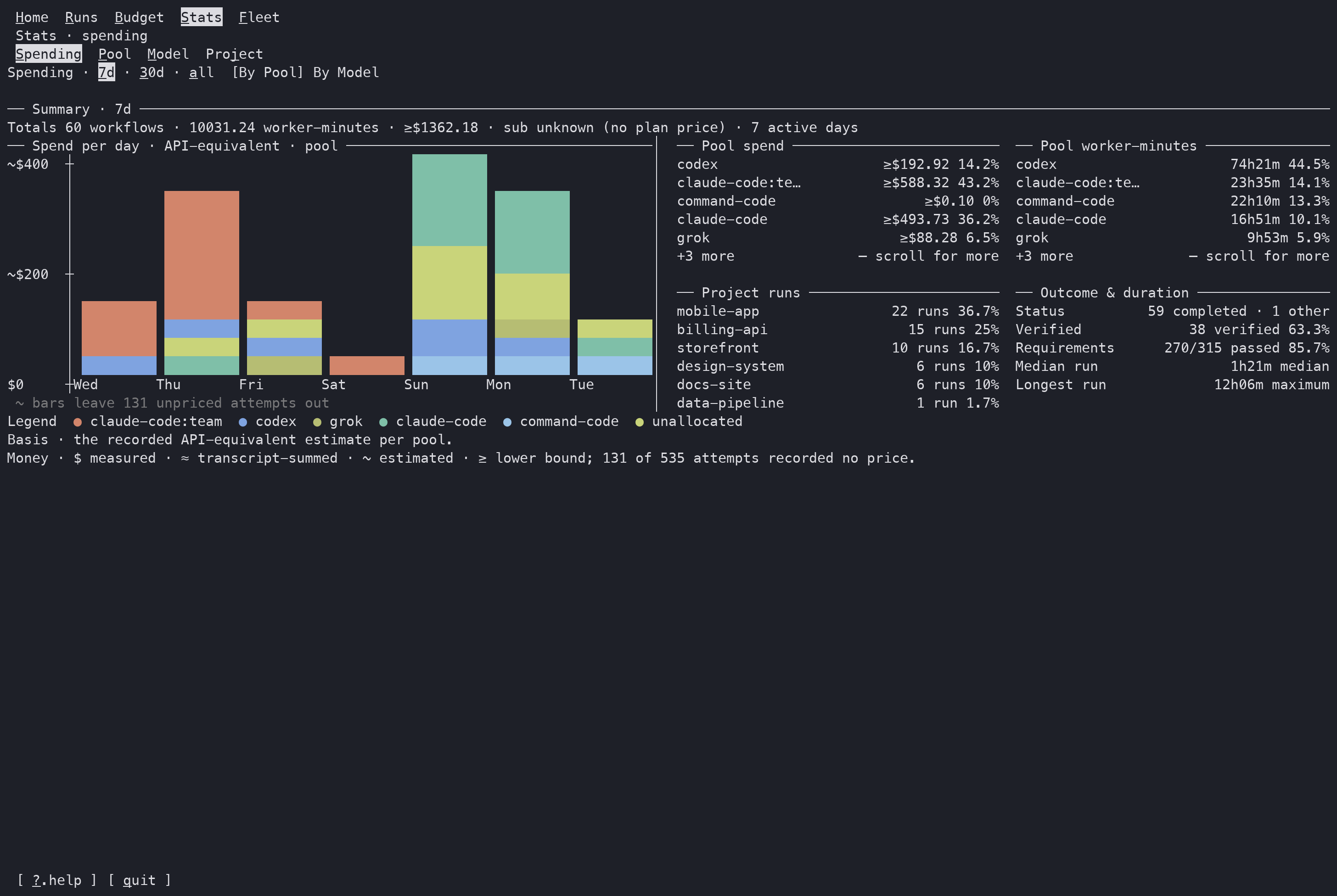
Stats compares the selected period without turning missing usage or money into a confident zero.
The other pages retain their existing period, budget, statistics, and fleet controls. The 0.35.1 changes described above are the layout contract for Home, Runs, Run, and Step; they do not turn an unavailable value into zero or replace the full Runs catalogue with a Home card.
The shared keyboard table is:
| Key | Does |
|---|---|
r | open Runs; the view refreshes itself, so r is no longer refresh |
b | open Budget; it is no longer move-out |
s | open Stats |
y | open Runs at its History table (the first day header), except that it confirms a pending stop |
f | open Fleet |
h | open Home |
? | open Help |
1–9 | open that run from the nav |
Tab | cycle the current page's sub-tabs (Stats and Fleet) |
Shift+Tab | cycle workflows |
p | cycle the page period (Home and Stats); on Run, toggle phase boxes |
Esc / ← | move out one page, then return to Home |
↑/k, ↓/j | move one line up or down |
Enter / → / l | open the selected run, step, tab, or action |
PgUp / PgDn | scroll up or down one screen |
Home / End | jump to the top or bottom |
ctrl+s | copy the screen through OSC 52, falling back to pbcopy, wl-copy, or xclip |
q | quit the dashboard; workflows keep running |
Page-specific controls include / (filter), a (active/all), and i (install) on Runs; v to switch the Step between its turn overview and the full-turn transcript; Enter to expand a selected overview turn or open every captured field behind a transcript row, and Esc to close it; t cycles the Step's activity filter and f follows its tail (which otherwise opens Fleet); v on Stats Spending to switch By Pool / By Model; and e on Fleet to open setup. On Run, p toggles the compact plan boxes and Space toggles following the live stream; Enter opens the selected step. c requests a cooperative stop from Run, and y confirms it. Mouse reporting is enabled while the dashboard is open: click any tab, tile, bar, run, step, date, or control, and use the wheel to scroll the body. The row or button under the pointer lights up in reverse video, so you can see what a click will open before you click.
TIP
r, b, Tab, and h were rebound in 0.33.0: the view refreshes itself, Esc and the left arrow move out, Shift+Tab still cycles workflows, and h opens Home (? alone opens Help; in 0.32.0 both keys opened Help). q quits the dashboard and leaves the run going; only c stops it, and that asks the kernel for a cooperative stop at its next safe checkpoint.
v3 runs: phases, gates, loops and answers
A run from a v3 program reads by its own blocks. Its steps group under the phase each one declares; a gate and a loop each get a row of their own; every attempt of a step that declares an answer shows that answer under its row; and a run that stops for you says where, with the command that moves it. A phase is the label a step declares ("phase": "writing"). A gate is a point where the run stops until you run bullswarm workflow continue. A loop reruns its steps until its condition holds, for at most maxRounds rounds.
A real run on grok, parked at its gate, on the Run page at 120 columns:
 ⧖ 2fne62 · waiting at gate approve · 3 of 4 steps done · 1 waiting (post)                                  3m44s active
 Write a two-line note, then wait for approval
 next: bullswarm workflow continue 2fne62 approve
── ✓ Phase 1 · research · count ────────────────────────────────────────────────────────────── 01:28 → 01:28 · 35s · 1/1
 01:28  ✓ count · grok · grok-4.7 · reasoning high · tier medium                                                     35s
        answer {"lines":4,"short":true}
── ✓ Phase 2 · writing · write · check ───────────────────────────────────────────────────── 01:28 → 01:31 · 3m09s · 2/2
        ✓ loop polish · passed in round 2 of 3 · check's evidence passed
 01:28  ✓ write · round 1 · grok · grok-4.7 · reasoning high · tier medium                                           51s
 01:29  ✓ check · round 1 · grok · grok-4.7 · reasoning high · tier medium             39s · returned early · 1 not done
        answer {"lines":1,"passed":false}
 01:30  ✓ write · round 2 · grok · grok-4.7 · reasoning high · tier medium                                           47s
 01:30  ✓ check · round 2 · grok · grok-4.7 · reasoning high · tier medium                                           52s
        answer {"lines":2,"passed":true}
── ○ Phase 3 · publish · post ────────────────────────────────────────────────────────────────────────── — → — · — · 0/1
 01:31  ⧖ gate approve · waiting for you · Read NOTE.md and decide whether to write DONE.md
continue: bullswarm workflow continue 2fne62 approve- Phases. The plan boxes and the timeline rules carry the phase name (
[✓ 1 research] → [✓ 2 writing 2/2] → [○ 3 publish]). Steps with no phase group by dependency level, as a v2 run's do; a step behind a gate or a loop sits one level after it. - A loop row heads the phase of its first step and reads
round N of maxwhile it runs,passed in round N of max · <condition>when its condition held, orout of rounds (N of max) · <condition> did not holdwith itscontinue … --rounds <1-5>command when it waits for you. A loop you continued without more rounds reads→ continued by the caller after N of max rounds (condition not met): it never passed. Each attempt of a loop step says its round (write · round 2). - A gate row heads the phase of the steps behind it and reads
waits after <steps>,waiting for you · <note>with itscontinuecommand,passed · continued by the caller, orskipped · <condition> does not holdwhen itswhencondition did not hold. - Answers.
answer {…}is the checked answer (it matched the step's schema);answer check failed · <why>is red. The Step page leads its result with the same answer, and its header readsanswer checkedoranswer check failed. A v3 step or run never readsverifiedornot verified: it reports facts. - Waiting runs stay in the
activeblock of Runs and in Home's running list, with the command under them:
 ⧖ 2fne62    we-proj   Write a two-line note, then wait for approval                      3/4 steps    4m   $1.16  01:28
waiting at gate approve · bullswarm workflow continue 2fne62 approve- A one-step run (
bullswarm run, or a v3 program of one step and no gate or loop) has no plan boxes and no phase rule: its timeline is the goal and the attempt rows, with the answer under them. - Counts. Stats and Home name one-step runs apart from workflows. Stats' totals line reads
1 runor3 runs · 5 workflows. Home's figure readsRuns: 3 · workflows 5 · verified 2 (40%),Workflows: 5 · verified 2 (40%)when there are no one-step runs, orRuns: 3when there are only one-step runs. Only a v2 workflow can be verified, so the verified count and its share are of the v2 workflows alone: when the period has none (only v3 runs and one-step runs), Home leaves the verified part out, as inRuns: 3 · workflows 2.
The Claude mod's pane draws the same timeline. Its strip and prompt context list a parked run as 2fne62 (waiting at gate approve, 12m): 3/4 done; continue: bullswarm workflow continue 2fne62 approve, and a bullswarm workflow watch or workflow wait result gets a note naming the gate or loop and its command.
Single bullswarm run tasks on the Runs page
A single task dispatched with bullswarm run is not a workflow, but it spends the same quota, so the dashboard counts it the same way.
A task in flight is read from the live assignment ledger, $BULLSWARM_HOME/assignments/*.json with source: "run", and appears in the Runs page's active block next to any running workflow. A finished task is read from state.json's decisionLog, where every bullswarm run dispatch now records its lane, taskFile and outFile alongside the pool, model and verdict it always recorded. Finished tasks appear as rows in the Runs history day table:
── Fri 18 Sep ─────────────────────────────────── 6 runs · 3 tasks · (cost unknown) ──
 ⚙  build · task · codex · gpt-5.6-luna                          ok  1h00m  11:05
 ⚙  build · task · opencode · openrouter/stealth/union-alpha  provider stream reporte…     0m  09:45
The ⚙ glyph is green for ok, red for a failure and cyan while the outcome is unknown; the row then carries the lane, the task identity, pool · model, ok or the short failure reason, the measured duration, and the time it ended. Each day header counts them separately — 6 runs · 3 tasks — and Home's today band counts tasks alongside workflow runs rather than ignoring them. Press Enter on a task row to open the same Step page as a workflow action, including the shared turn/detail toggle and activity controls.
The task adapter keeps the recorded lane, project, pool, model, timestamps, duration, status/reason, and task/output paths. A task has no inferred effort, verification verdict, usage, money, result envelope, or stream; missing values remain unavailable and a missing stream is shown as event stream unavailable.
A task recorded before these fields existed has no id, task file or start time. It still appears, showing — for what it does not have, and it is listed and counted once even though the day page and the task ledger both offer it.
The Claude mod's pane shows a task in flight too, instead of the old No ongoing workflow run.
Output samples
Each attempt records how many bytes its worker's output held over time, as outputSamples on the durable attempt record: a bounded list of [atMs, bytes] pairs, at most one per five seconds and capped at 240 per attempt, so a reader can see the shape of a worker's progress without loading the transcript. No dashboard page draws them in this version; read them from the run's state.json (attempts[].outputSamples).
The Step page: one header, turns, result, task, cost
Press Enter on a workflow action—or on a single-task row—to open the Step page. The workflow action and the task record are normalized into the same model and view. The page says the header once, then draws four blocks:
- Header — line 1 is the verdict: the step, its run, the execution status, the independent verdict, and the selected attempt (
attempt 1 of 2). Line 2 is the purpose. Line 3 ispool · model · effort · reasoningon the left and the clock on the right. Each stored not-done item is its own line under that, clipped to the width, and the route sentence follows. Nothing below the header repeats it. - Activity — the turns. A turn is one response and the tools that led to it; the rule carries the turn count and the totals, and the last cells of the rule are the filter control.
- Result — the report's first lines, the paths the diff file recorded, the step's
Shared-file requestswhen its report has that heading, and the artifact row. Execution success and independent verification stay separate facts. - Task — the author's own first lines, then
owns/after/affectsas short facts. The kernel wrapper (workspace rules, dependency list, "read every dependency output…") lives behind the block, with its size stated. - Cost — two rows, API rate and the pool's plan, each with its amount and one line of basis, plus the token classes under the API amount. Unknown money stays
—with its reason, never an invented zero.
At 160 columns and wider the activity takes the left column and result, task and cost stack on the right, so a finished step fits one screen. At 120 the right column narrows to 40 columns; below that the page stacks like the phone, in the order result → activity → task → cost, so the answer is on top and the task, which you already know, is at the bottom. While a step runs the phone leads with now (the newest captured fact) instead of the result.
The clock: active minutes, span only when it differs
The header prints one clock in h/m/s (49m07s). The span across an idle gap appears only when it differs from the active time, as 49m07s active of 1h02m. While an attempt is live the clock runs from the attempt's start and the header adds turn 8 and last event 02:20:26 HKT, 3s ago; a finished step prints 49m07s · 01:50 → 02:39 HKT · 20 Sep 2026 instead.
Execution success and verification remain deliberately separate. An action can be succeeded while a workflow is still unverified; a result says verified 6/6 only when the durable evidence gate says so. While an action is running, verification is pending, not false. Retry records retain the pool, model, ordinal, status, timing, route, failure, output bytes, token source, and money pair for every attempt; they are not an inferred transcript.
Turns are the unit
The overview prints the latest ten turns on a desk or five on a phone, preceded by one turns 1–N · … · click for detail line when earlier turns exist. Each turn shows its number, response clock, up to two lines of response, and only non-zero tool counts (35 commands, 14 commands · 3 edits, no tools). On the desk counts end the second line; on the phone they take their own row. The started and completed halves of one operation count once. Each provider's connector maps its tool names to command, read, search, edit or other; the core has no provider-name table and never infers a kind from command prose. When the other tools class is a single kind the row names it. A still-streaming response is one turn whose text is the chunks captured so far; a chunk is never a row of its own. The last turn is the result: its row reads → the report, shown under result instead of printing the report twice.
Enter on a turn expands it in place: the whole response, its counts with Esc closes, and its newest three tool rows with their own clock and measured duration. Older rows fold into one line above them — ↑ 6 earlier commands · Space page up — and Space, PageUp and PageDown walk that three-row window back and forward through them. Opening, collapsing or moving to another turn resets the window to the newest rows. Esc collapses the turn again.
A tool that has not finished keeps its place at the bottom of that window: it draws a spinner and the time it has been running so far, and it is counted in the collapsed turn's counts like any other. A tool that finished in under a second prints no duration at all rather than a misleading 0s, and a capture that carried no summary is named by its event kind instead of reading summary unavailable. While the step is running and the page is following, the current turn is expanded by default, so the newest tool rows are on screen without a keypress; f stops the follow and leaves the page where you put it.
Press v for the transcript. Every turn is expanded in order: full response, counts, then one row per command or tool call. Enter on a head or tool row opens every captured technical field (seq, time, source, provider type, kind, status, ids, provider timestamp, duration, usage, parent/subagent, arguments, result and summary). Missing optional fields are labelled unavailable. Without a structured stream the page says event stream unavailable; prose never creates synthetic activity.
Money in plain words
The two rows answer different questions:
API rate    $0.96   36.0M tokens · OpenAI rate card, 20 Sep
                    35.2M cache read · 713k input · 58k output
codex plan  —       no meter reading for this attempt
                    $100/mo · weekly window
measured from the codex transcript
API is the dated model-rate equivalent (or a transcript sum/byte estimate), while the plan row is a measured or calibrated quota-window debit. An exact amount prints plain, an estimate gets ≈, and an unknown gets — with its reason. The row's basis phrase and the closing measured from… line are word maps over the finite basis and tokenSource codes in src/lib/usage-basis.js, so a new code prints itself rather than a blank. Token classes print only when the capture recorded them, so grok shows reasoning and Claude shows cache write. A live attempt says measured when the attempt finishes (codex transcript) instead of guessing.
Every missing layer has a named state rather than a blank that looks complete:
| What is missing | Step page says |
|---|---|
| No stream file, or a historical attempt whose stream was not retained | event stream unavailable; turns, tools, timing, and event usage cannot be reconstructed |
| Plain stdout fallback | plain stdout capture has no structured events |
| Bad JSONL lines | the parse-error count and malformed stream lines ignored |
| Bounded capture | truncated and the dropped-event count |
| No stable turn ids | turns not captured |
| No tool id/name/arguments/result | the corresponding detail field is unavailable |
| No provider timestamp or duration | capture time is shown; provider time/duration is unavailable |
| No parent or subagent ids | subagent structure is not captured |
| Live attempt without usage | measured when the attempt finishes, not a guess |
| No API rate, subscription meter, plan price, or calibration | the amount is — with its reason (no meter reading for this attempt) |
| No durable result envelope | no report was written for this step; a separate verification stays separate |
| No verification verdict or requirement evidence | not verified (0/1 requirements) or verification unavailable |
| No task, output, stream, or result path | the artifact row names only what was recorded, else no artifact paths recorded |
Step keys
| Key | Does on Step |
|---|---|
v | switch between the latest-turn overview (the default) and full-turn transcript |
↑/↓ | select the next or previous turn head or tool row |
Enter | expand/collapse an overview turn, open a transcript row's captured fields, or open the fold line in detail |
t | cycle the activity filter: turns → tools → errors → all |
f | follow or stop following the activity tail |
Space | page an expanded turn's tool window back through its older rows, or toggle the follow when no turn is expanded |
PageUp/PageDown | the same tool window, older and newer |
Esc | collapse an expanded turn, or leave the page |
The footer carries the hints once: Enter expand turn · Esc close · v detail (every event) · t filter · f follow · ? help on the desk, and the short form on the phone.
Budget: every window a pool reports
Budget no longer shows one window per pool. It shows every window the provider actually reported — the rolling 5-hour window, the 7-day window, and the monthly window where a pool has one — each with its local reset time and its pace:
command-code · monthly plan · resets Sat 17 Oct 11:06 (in 28d 16h)
windows 5-hour (5h) · 1% used · resets 20:56 GMT+8 · behind by 44 pts
        7-day (7d) · 1% used · resets 12:26 GMT+8 · behind by 16 pts
        monthly (mo) · 1% used · resets 11:06 GMT+8 · behind by 4 pts
Pace is behind by <n> pts / ahead by <n> pts / on track, comparing that window's used share with the share of it already elapsed. A window nobody reported is absent, not zero — codex above it shows only 7-day (7d), and the cards fold onto one row when the width allows. The page header says how old the numbers are:
Budget · 7 days to Asia/Hong_Kong · sampled 5m agoThe age is just now under a minute, then 5m ago, 2h ago, 3d ago. A reading with no capture time shows no age at all rather than implying freshness — a stale meter can no longer be misread as a live one.
Budget: detected plan prices
Money per pool needs a monthly subscription price. You can still declare one with bullswarm strategy set-subscription <pool> --monthly-usd <amount>, but each provider now also reports the plan name it can detect for itself: Claude's subscriptionType / rateLimitTier from ~/.claude/.credentials.json, Codex's plan_type, Command Code's plan, and opencode's plan.
data/plan-prices.json maps a plan name to a monthly USD figure only where a vendor page was actually read; each entry quotes the page URL and the exact line the number came from. A plan with no citable price stays null and Budget says the price is unavailable rather than inventing one.
A detected price is spent exactly like a declared one, and the plan line says which it is, so your own figure is never confused with an inferred one:
plan · $100/mo detected max 5x
plan · $20/mo declared
The provider half of the lookup is the provider, not the pool: a discovered per-account pool such as claude-code:acme resolves against claude-code's plan table, so one login per account still gets its price.
The history index and workflow reindex
Home, Runs, Budget, and Stats read a per-run rollup, written to <run dir>/rollup.json when a run finishes and appended to the history index at ~/.bullswarm/history/runs.jsonl. Nothing rescans every run directory on each frame. Runs finished before 0.33.0 have no rollup yet, so a freshly upgraded home shows no run has been rolled up yet · bullswarm workflow reindex backfills them until you run it once:
bullswarm workflow reindexLegacy runs with no V2 state get a minimal record marked legacy; only runs still in flight are skipped. The command is idempotent, so a second run writes nothing new, and --force rewrites every record. See workflow reindex for the flags and the JSON it prints.
Testing with a copied home
When a dashboard render or an observation bug needs a real home, prefer a selective snapshot over cp -Rp ~/.bullswarm. It keeps the routing, meters, provider files, single-task ledger, and a small workflow slice, then rebuilds the copied history index. The source is never written, and --no-streams drops the large per-attempt stream and stdout files:
bullswarm home snapshot /tmp/bsw-snapshot --recent 3 --no-streams --json
BULLSWARM_HOME=/tmp/bsw-snapshot bullswarm workflow tui --json
Keeping the home small
Since 0.35.2 the home stops growing forever. The disposable workspaces/ copies inside finished runs are removed seven days after each run's finishedAt by a detached background sweep that the kernel, watch completion and the dashboard start (at most every 6 hours, one at a time). Records, reports, streams and task/out markdown are never removed. The policy is state.json.retention (see Retention). home status shows what the automatic jobs last did:
bullswarm home status
# home /tmp/bsw-snapshot
#   retention        on · workspaces of finished runs go after 7 days
#   workspaces       0 runs · 0 B on disk · 0 B reclaimable now (0 runs)
#   last prune       never
#   last reprice     never

bullswarm home prune --dry-run   # list what would go, with bytes; changes nothing
Budget's meter cells use the shared green (#b6bd73), amber (#e9c880), red (#bf6c69), and dark-track (#3a3a3a) palette. The other shared roles are purple, orange, cyan, dim, others, and a four-shade heat ramp. A white ▏ marks elapsed time. Money and licence figures are measured when their source supports it; otherwise they are blank or carry ≈ with their basis. The Fleet [edit] action hands the terminal to setup and returns with fresh data. Runs' [install] runs the same as bullswarm integrate install --yes; once every agent is installed it reads [installed ✓] and is inert.
Watch prints only events
workflow watch prints one attach line, then one line per notable event — an action finishing, failing, blocking or being cancelled, evidence recorded, a stage completed, a planner turn, a stall or recovery, cancellation — and stays silent while work is merely in progress. That silence is the signal: no line means nothing has happened that needs you.
# follow one run until it pauses or reaches a terminal status
bullswarm workflow watch ab12cd

# also print agent starts, mechanical retries, and steering delivery
bullswarm workflow watch ab12cd --verbose
A usage-limit failure prints whether or not --verbose is given: a ⚠ <actionId> usage limit on <pool> line, with back at <time> in it when the watch knows when the pool is back. In runs started by this version the line ends back to you: a usage limit (a spent 5-hour or weekly window, or no credit left) ends the step, nothing waits for the pool or moves the step, and a needs-you block follows. The attempt's event carries no return time, so the line reads ⚠ <actionId> usage limit on <pool> · back to you; the needs-you block that follows carries the time instead, as its back at <time> line, when it is known. A run from an earlier version reads retrying on another pool, then prints a ↺ <actionId> now on <pool> · <model> line once the retry lands there. A saved attempt that still promised a retry reads no retry spent.
0.38.0 removed the preflight scout and the dispatched planner, so these lines come only from a run saved by 0.37.x, which watch still replays. In such a run a usage limit, a rate limit still there after its backoff, or no free pool stopped the scout, and the watch prints ⚠ preflight scout stopped · <label> on <pool> · back at <time>, where <label> is out of quota, rate limited or no eligible pool and <pool> reads no pool when none was picked; back at is left out when no return time is known. When the run had its caller's program the line ends · the run continues without its report and the steps ran; without one the run finished and its reason: starts the preflight scout stopped on a usage limit (or the preflight scout stopped: no pool free). A dispatched planner that stopped the same way prints ✗ planner stopped · <label> on <pool> · back at <time>, with the same labels, no pool and back at rules, and the run finished with the workflow planner stopped on a usage limit: …; such a run is view-only now, so workflow resume refuses it and a new run with your own program v3 carries the work on. The planner's or scout's schema correction, and the one retry on the same pool it got when no other pool could run it, never went back to a pool that has become nearly spent: the correction moved to another free pool, and with none free it stopped the same way, with that pool's nearly spent reason. A planner turn that failed for any other reason, and every planner failure in a run from before 0.37.x, prints × planning attempt rejected · <why>. Before either stop line, a scout or planner attempt that hit a usage limit prints its own usage-limit line, which ends no retry left there (⚠ preflight-scout usage limit on <pool> · no retry left) and is followed by no needs-you block.
When a step comes back to you the watch prints a needs-you block. With --jsonl the same block is one object whose options hold the commands: rerunElsewhere (step rerun <id> <step> --avoid <pool>) when another pool could run the step, else retryHere (step rerun <id> <step>); waitForIt (after <time>: step rerun <id> <step>) in a run started by this version whenever the step's return time is known (after a usage limit, a rate limit that named a longer wait, or with no pool free); addSteps (workflow add <id> --steps part.json, then workflow wait <id> <added ids>) in a v3 run, or, in a saved v2 run, changeStep (plan export …, edit it, then plan revise …, as it was written; 0.38.0 removed those verbs and the run is view-only); takeOver; and acceptAnyway. The same object then carries backAt, the time printed as back at <time>. A try that followed a rate-limit backoff on the same pool reads · after a rate-limit backoff. A review block adds otherChecks when a second check also failed a requirement, one entry per check with its own rerun and accept commands. A step rerun or accept that reopens a cancelled run prints run reopened from cancelled by a plan revision, followed by · not run again (act step, may have acted): <steps> when an act step stays cancelled. A finished run that workflow resume reopened prints run reopened from <status> by workflow resume.
Watch until trouble
An agent that starts a run should start one watch for that run and do nothing more about it until the watch exits. Run it in the background when your harness wakes you when a background process ends; otherwise (a subagent whose turn ends when it replies) run it in the foreground, where it blocks until the wake, with --timeout set below your tool call's time limit: at the timeout it prints ⧖ watch timed out after <s>s · the run is still running and a next: line carrying --after, --since and --timeout; run that line again (a restart without --after attaches at the newest event and skips what happened in between). Never end your turn while a run you own is still running. The watch prints one start line (watching ab12cd until trouble · 4 steps) and then nothing until a wake:
# silent while work goes well; exits on the first trouble or at the outcome
bullswarm workflow watch ab12cd --until trouble

# the same lines, but only the outcome ends it
bullswarm workflow watch ab12cd --until outcome
--until prints its start line, then no attach line and no routine lines: no finished steps, no completed stages, no retries that recovered. It prints only trouble, then the outcome. In a v3 run it also prints one line per loop that finished since the last wake (✓ loop polish passed in round 2 of 3, or blocked in round 1 of 3), without waking, so a wake at a gate already says how the loop before it ended. Trouble is a step that failed or was blocked, a check that rejected a requirement, a rejected plan revision or planning attempt, a planner or preflight scout that stopped on a usage limit, a pause request or pause stop, a worker the kernel stopped as stalled, a step that looks stale, or steering left for the caller. With --until trouble the first trouble ends the watch (exit 0 while the run goes on) and prints the line to start again from. A real run on a copied home, where one of three steps had a worker that exits 1:
$ bullswarm workflow watch p82z92 --until trouble
✗ broken failed · process: verified content but non-zero exit · 9s
⊘ later blocked · failed dependency
next: bullswarm workflow watch p82z92 --until trouble --after 14 --since 2026-09-21T06:16:24.540Z

$ bullswarm workflow watch p82z92 --until trouble --after 14 --since 2026-09-21T06:16:24.540Z
outcome: partial · not verified
reason: 2 of 3 steps did not succeed: broken failed (process), later blocked (dependency)
  step broken: failed (process) — verified content but non-zero exit
  step later: blocked (dependency) — failed dependency
  ...
next: bullswarm workflow runs result p82z92 --json --summary
The third step's success was never printed; the relaunch picked up at sequence 14 and ended at the outcome (exit 1, not delivered). Each exit is one wake: read it once, act, and start the next: line again. The raw silent for line does not print under --until. The stale score replaces it, because a step running a long command is not silent.
A step that looks stale
For each running attempt the watcher scores four signals. It reads them from the attempt's persisted stream and from file modification times. A step that declares owned files is scored from those files only. A writing step that owns no files, such as the integrator, is scored from the files git status lists as changed in that workspace, so a later edit to a file already marked modified counts, including an edit made through a shell command. When git cannot be read, that check contributes nothing and the score uses the stream.
| Signal | Fires when | Weight |
|---|---|---|
| quiet | no event for 10 minutes while no command is in flight | 2 |
| no file change | a writing step (it owns files, or is build or chore) changed nothing for 20 minutes while at least 5 commands ran | 1, and 2 (stale on its own) once it lasts 40 minutes |
| repeat | the same command 3 times in a row, no file change between | 1 |
| wall | past 3× the router's expected minutes for the step's lane and effort | 1 |
While Bullswarm runs a step's declared checks, only quiet counts, read from the checks' heartbeat (no check heartbeat for <N>m).
No file change alone reaches a score of 2 after 40 minutes (or at the fifth command since the last change, if that comes later). A writing step that only reads, never quiet and never repeating a command, is still flagged, for example ⚠ build looks stale: no file change in 41m while 7 commands ran. That line exists to come before the stop below.
At a score of 2 it prints a line for the attempt, for example ⚠ verify looks stale: quiet 12m with no command running. While the attempt stays stale and shows no progress (no file change for a writing step, no output for any other), it prints one more line after each further full window (20 minutes for a writing step, 10 for any other), one level higher: ⚠ verify still looks stale (warning 2) · no file change for 45m00s: <reasons>. Progress while it stays stale restarts the window without a line, and the next warning is still one level higher; a reading that is no longer stale, with or without progress, ends it, so a later one starts at warning 1 again. Each line wakes --next and --until trouble, whose exit adds the command that answers it:
⚠ verify looks stale: quiet 12m with no command running
next: bullswarm workflow watch euqrni --until trouble --after 33 --since 2026-09-19T22:13:49.637Z
  or restart: bullswarm workflow step restart euqrni verify
The watcher's lines restart nothing on their own. Separately, the dispatcher stops a build or chore worker that changed no file for BULLSWARM_WORKER_NO_PROGRESS_SEC seconds (default 3600, 0 turns it off) as stalled, and the step gets its one retry on another pool. With the default limit the 40-minute stale line comes before that stop; a step that ran fewer than 5 commands since its last change, or a limit below 40 minutes, can be stopped without one. A workspace that cannot be read whole (more than 5,000 changed files, or a folder too large to walk) never triggers the stop. The score was replayed through every real attempt in a copied home: 128 finished attempts with streams, checked every 15 seconds of each attempt's life. It flagged three. One was real: a codex step at 55 minutes against an expected 13, which had run the same command three times in a row, and which finished at 58 minutes. The other two were replay artifacts. Those streams had passed the 1 MiB cap, so their middle events were dropped from the saved file, and the replay saw a gap. A live watcher always has the newest events, because it also reads the .tail segment.
bullswarm workflow step restart <runId> <step> [--pool <pool>] stops that step's running attempt, and only that one. The step goes back in the queue without passing through a finished state. Its next attempt gets the stopped attempt's ## Prior attempt on this step handoff block, on --pool when one is given. The same run, on a copied home with two echo pools:
$ bullswarm workflow step restart x3zdma slow-write --pool echo2
✓ restarted slow-write in x3zdma: stopped slow-write-1 on echo; it runs again with its handoff on echo2
  watch    bullswarm workflow watch x3zdma --until trouble
and in bullswarm workflow watch x3zdma --verbose:
↻ slow-write restarted · stopped slow-write-1 on echo · runs again with its handoff on echo2
↪ slow-write handed off from echo · 0 files · last said ""
▶ slow-write started · echo2/echo-local · attempt 2
✓ slow-write finished · 38s
The stopped attempt ends cancelled with failureKind: restarted, and its handoff reads - Failure: restarted — stopped by the caller with workflow step restart (restart-48516b5d). The command exits 1 and changes nothing when the run is finished, the step is not running, or the run's kernel is not running.
Wake on the next event
Use --next when the caller is an agent that should sleep until something happens, instead of holding a follower open. It prints no attach line, exits after the first notable event, and — while the run continues — ends with the line to relaunch from.
# print the next notable event and exit
bullswarm workflow watch ab12cd --next

# the relaunch: copy --after and --since verbatim from the previous next: line
bullswarm workflow watch ab12cd --next --after 42 --since 2026-09-08T10:15:00.000Z
Both values matter. --after resumes from the durable event sequence the previous watcher consumed, so events committed while nothing was attached are printed instead of skipped; --since is that watcher's exit time, so an agent whose silence it already reported does not produce a duplicate stall line.
Exit 0 while the run continues or when it delivered; exit 1 when it ended without delivering or no kernel is running. A pause or a terminal status exits immediately with its own outcome: and next: lines instead of a relaunch line.
Watch options
| Flag | Meaning | Default |
|---|---|---|
--until outcome|trouble | print only trouble lines, each v3 loop that finished, and the outcome; trouble also exits at the first trouble line | off (follows until terminal or paused) |
--next | print no attach line; exit after the first notable event | off (follows until terminal or paused) |
--after <sequence> | start from this durable event sequence instead of the current high-water mark | attach at the high-water mark |
--since <iso-timestamp> | the previous watcher's exit time, so an already-reported stall is not repeated | report every silent agent at attach |
--jsonl | one JSON object per event, each carrying its sequence, and no relaunch line | off (human text) |
--once | print one current snapshot and exit | off |
--verbose | include started, retry, and steering-delivered lines | off |
--stall-after <seconds> | report a running agent as silent after this long without activity | 300 |
--heartbeat <seconds> | periodic line when nothing has changed; opt-in for event mode | off (60 with --classic) |
--classic | the older heartbeat-based watcher instead of event mode | off |
--interval <seconds> | poll interval | 2 |
Watching is read-only, and it never dispatches anything. --classic applies only to current-engine runs and cannot combine with --next. --until cannot combine with --next, --once, --classic or --heartbeat.
List and inspect runs
# ongoing runs only, the default listing
bullswarm workflow runs

# ongoing plus historical, filtered by exact goal text
bullswarm workflow runs --all --name audit-code

# runs initiated in the last week
bullswarm workflow runs --all --since 7d

# one run's durable state: status, requirements, actions, and attempts
bullswarm workflow runs show ab12cd
Every run has a 6-character shortId (no 0, 1, i, l, or o); the full wf-… runId is the durable handle, and both work anywhere an id is accepted. Time filters compare when a run was initiated and accept ISO timestamps, local YYYY-MM-DD dates, today, yesterday, now, or durations such as 30m, 24h, 7d, and 2w. Historical authored-graph runs appear as read-only legacy rows, and every driving command refuses them with exit 2.
Read the result
# the compact status-loop envelope: status, verified, reason, actions, usage, next
bullswarm workflow runs result ab12cd --json --summary

# the full versioned document, for a failed or partial run or before judging evidence
bullswarm workflow runs result ab12cd --json
--summary implies --json and is the form to poll with; read the full envelope when something failed or before you judge evidence. next.runDir and each action's outFile point at the durable artifacts, and workflow runs show remains the low-level debugging surface.
Inspect one action
# one action's ledger entry, every attempt, its output, and its events
bullswarm workflow action show ab12cd write-a

# replay the durable event log after a sequence cursor
bullswarm workflow events ab12cd --after 0
action show names the action's outputFile — read it before deciding the rest of the plan still fits. events is the machine-oriented replay; page through it by passing the last returned sequence to --after.
What one attempt leaves on disk
Every attempt writes its normalized event stream into the run directory (~/.bullswarm/workflows/<runId>/, or $BULLSWARM_HOME/workflows/<runId>/) next to its task and output files:
| File | Written when |
|---|---|
task-<action>-attempt-<n>.md | the task text the attempt was handed |
out-<action>-attempt-<n>.md | its final answer, or the partial text a stalled worker left |
stream-<action>-attempt-<n>.jsonl | the connector declares an eventStream |
stdout-<action>-attempt-<n>.log | it does not: a bounded plain tail instead |
diff-<action>-attempt-<n>.txt | git diff --stat of the step's territory, taken the moment the worker exited |
The stream is one JSON object per line with seq, at (ISO, stamped by the kernel, not by the provider), source, providerType, kind, status, and summary. A response event keeps its text here up to responseBytes — the live pane's 180-character clip is a display choice, not the record:
{"seq":1,"at":"2026-09-17T08:30:46.101Z","source":"stdout","providerType":"item.started","kind":"command_execution","status":"running","summary":"ls src/workflow"}
{"seq":3,"at":"2026-09-17T08:30:46.102Z","source":"stdout","providerType":"item.completed","kind":"response","status":"completed","summary":"Read the task file and enumerated 3 candidate files."}
{"seq":7,"at":"2026-09-17T08:30:46.102Z","source":"stdout","providerType":"item.completed","kind":"response","status":"completed","summary":"## Partial\n\nRead the task file and enumerated 3 candidate files before going quiet."}
The JSONL stream is bounded as a head, then one {"truncated":true,"dropped":<n>} marker line, then a tail. The fallback for a connector with no eventStream is different: stdout-…-attempt-….log is a marker-free bounded plain tail. Core allows 1048576 bytes per file and 64000 bytes per response event; a connector may raise or lower either in its eventStream.capture block (see providers).
The sink appends head records synchronously. Once a cap is exceeded, its in-memory tail is flushed to the sibling .tail segment every 32 events or 2 seconds, whichever comes first; close() folds the head, marker, and tail back into the final JSONL file (or the marker-free stdout tail). If the kernel is killed outright (SIGKILL) the head records are already on disk and the final file holds them; whatever the tail segment had flushed stays in the orphan .tail sibling, which nothing reads back or folds in, and the events still in memory are lost.
action show reports the paths and the byte counts on every attempt, failed ones included, plus handoff on an attempt that inherited a predecessor:
{
  "id": "edit-owned-1", "ordinal": 1, "pool": "staller", "status": "interrupted",
  "failureKind": "stalled",
  "outputFile": ".../out-edit-owned-attempt-1.md", "outputBytes": 83,
  "streamFile": ".../stream-edit-owned-attempt-1.jsonl",
  "diffFile": ".../diff-edit-owned-attempt-1.txt", "changedFileCount": 1,
  "lastResponse": "## Partial\n\nRead the task file and enumerated 3 candidate files before going quiet."
}
{
  "id": "edit-owned-2", "ordinal": 2, "pool": "answerer", "status": "succeeded",
  "handoff": { "from": "edit-owned-1", "bytes": 1108 }
}
handoff.bytes is the size of the block the attempt was handed; it varies with the run directory's path length, so the figure above is one measurement, not a constant.
The next attempt is told what the last one did
When an attempt ends without success and the step is retried — on another pool or the same one — the task the next worker receives ends with a ## Prior attempt on this step block built from those files. (The bounded schema-correction path keeps its own block and never gets this one.) A real block, from a two-step fixture run whose first pool went silent:
## Prior attempt on this step

- Pool: staller
- Model: zen/union-free
- Started: 2026-09-17T08:30:46.056Z
- Finished: 2026-09-17T08:30:54.133Z
- Duration: 8s
- Failure: stalled — stalled: the worker wrote nothing for 8 s and was stopped
- Files changed inside this step's territory: owned.txt
- Diff stat at the moment it ended:
```
owned.txt | 1 +
 1 file changed, 1 insertion(+)
```
- Diff snapshot: .../diff-edit-owned-attempt-1.txt
- Final answer / partial output: .../out-edit-owned-attempt-1.md (83 bytes)
- Stream file: .../stream-edit-owned-attempt-1.jsonl
- Last response events:
  - 2026-09-17T08:30:46.102Z: Read the task file and enumerated 3 candidate files.
  - 2026-09-17T08:30:46.102Z: Editing owned.txt with the first pass before checking the tests.
  - 2026-09-17T08:30:46.102Z: ## Partial Read the task file and enumerated 3 candidate files before going quiet.
- Those edits are unverified. You decide whether to keep, fix or revert them, and you must report which.
The diff stat is frozen at the moment the worker exited, so edits a sibling step makes afterwards are never blamed on it. The stream is named by path and never pasted in. workflow watch prints the same handoff as one line:
↪ edit-owned handed off from staller · 1 files · last said "## Partial Read the task file and enumerated 3 candidate files before going quiet."One frame for a caller
# one plain-text frame (timeline, Live, Next) with no escape codes, for embedding
bullswarm workflow tui ab12cd --overview --width 90 --height 24

# the run list as JSON, ongoing plus historical
bullswarm workflow tui --json --all

# one run's state, report, and events as JSON
bullswarm workflow tui --json ab12cd
These are the non-interactive forms. Without a TTY, workflow tui <runId> prints one static text tree instead of opening the browser, so a caller that only needs the current picture still gets it.
Glyphs in your terminal
The live views draw a Braille spinner and symbol marks (●, ✓, ✗, ⧖, ⚠). macOS Terminal.app ships no monospace font that can draw the spinner or ⧖, so those cells repaint as flashing ? — the terminal cannot tell Bullswarm which font is loaded.
Apple Terminal is detected and given a one-column ASCII table instead; a non-UTF-8 locale, TERM=dumb, and TERM=linux also select ASCII. Override the detection either way:
# force ASCII when your terminal shows ? for the glyphs
BULLSWARM_ASCII=1 bullswarm workflow

# force Unicode when the detection guessed wrong
BULLSWARM_UNICODE=1 bullswarm workflow
The Claude Mod counterpart
Inside Claude Code, the Bullswarm mod (mods/bullswarm) is the dashboard's read-only counterpart. Its pane shows Run, Step, and the Usage/Pools page (meter windows and fleet rungs); it does not show Home, Runs, Budget, Stats, Fleet, or Help as dashboard pages. The strip remains the run list. The pane's bottom row is back (on a step), the run buttons, usage and close, with no dashboard [edit] or [install] actions. Its strip and pane re-read ongoing runs every 20 seconds; the full details are in Claude Code integration.
Next steps
- Workflows — author the program a run executes.
- Result envelope — every field of the result document.
- Claude Code integration — the packaged skill, the MCP server, and the mod pane.