
Introduction
Bullswarm turns the coding-agent subscriptions you already use into one paced, observable fleet. It routes work through their official headless CLIs, records what happened, and verifies the saved result before it calls the work useful.
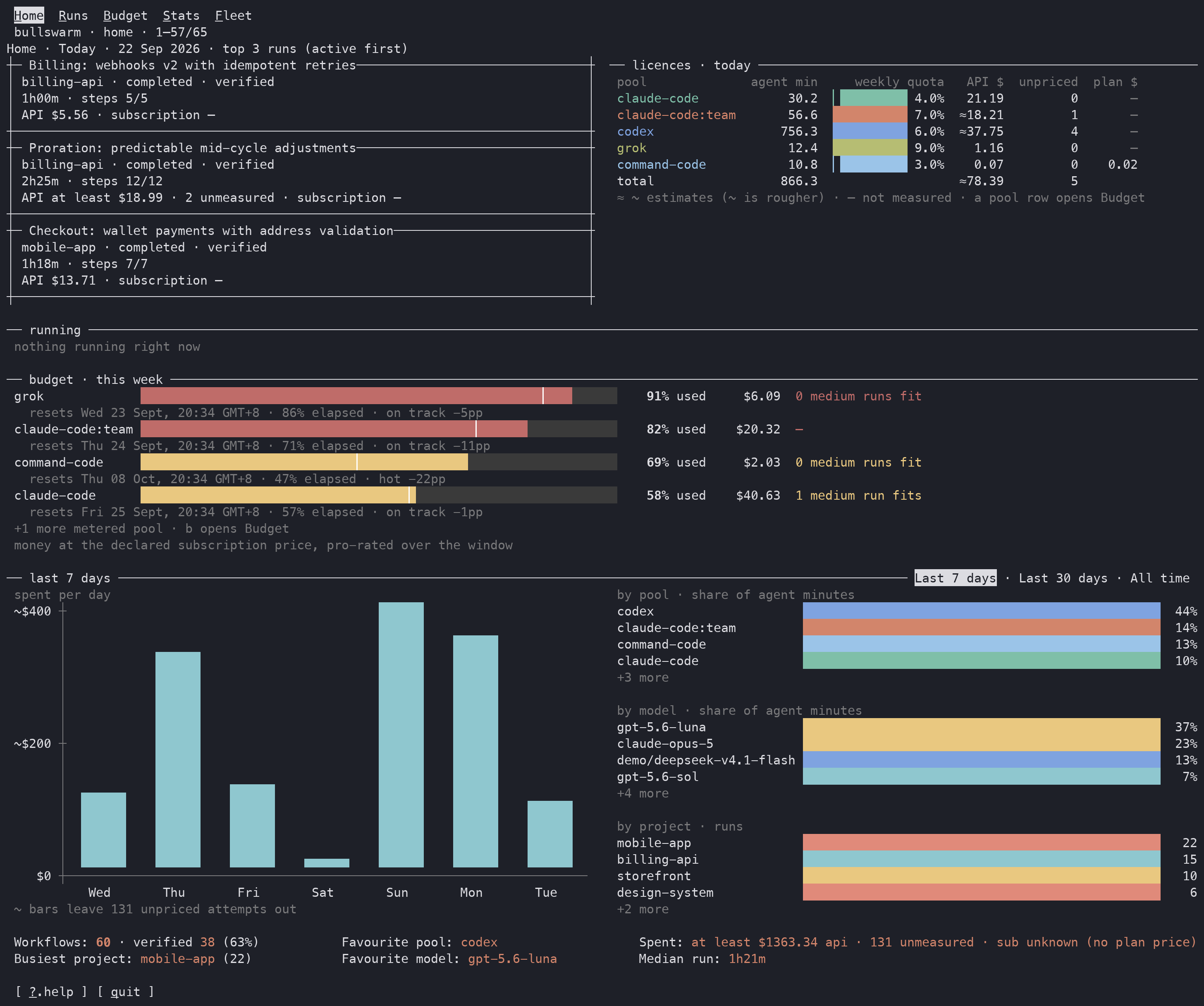
Home keeps active work, recent results, and subscription pace in one view.
The problem
Several coding-agent subscriptions can mean several separate quota clocks, commands, model menus, transcripts, and failure modes. Choosing one by habit can leave quota unused on another. Starting several by hand makes it hard to see which agent owns which part, whether a process merely exited, and whether anyone independently checked the result.
The value
Bullswarm gives your main agent two deliberate ways to hand work off:
- one bounded outcome goes through
bullswarm run; - parallel territories, integration, or independent acceptance use a caller-authored
bullswarm workflow goalprogram.
The router compares each eligible pool with its own quota clock, accounts for work already in flight, and prefers quota at risk of expiring. Durable run, attempt, output, and evidence records make the work inspectable from the CLI or dashboard after the delegate process has gone away.
What Bullswarm is — and is not
Bullswarm drives the official headless CLIs on your own machine and uses the subscriptions already logged in there. Built-in agent CLIs are Claude Code, Codex, and Grok; OpenCode and Command Code are contributed providers.
It is not an API proxy. It does not pool API keys behind a hosted endpoint, replace a provider's CLI, or make provider-specific behavior part of the core. Each provider owns how its CLI launches, how output is read, and — when the provider exposes it — how usage is measured. Bullswarm owns routing, coordination, durable records, and verification.
Two ways to start work
There are exactly two entry points, and you choose the shape yourself — there is no preview or classifier step between them. bullswarm run sends one bounded task to one delegate and prints one verdict. bullswarm workflow goal executes a program you author across several pools.
# one bounded outcome: route, dispatch, verify, print one verdict
bullswarm run --lane analyze --add-dir ~/some-repo --prompt "Explain the parser" --json

# several dependent steps: you author plan.json, the kernel executes it
bullswarm workflow goal "Fix the failing tests and verify the change" --cwd ~/some-repo --program plan.json
Use run when the work ends in one answer you could describe in a paragraph. Use workflow goal when it has parallel territories, an integration step, or acceptance you want judged on its own — see Workflows.
The four rules
These are the non-negotiable rules the rest of the tool is built on. Everything else on this site follows from them.
- Content decides, never the exit code. Every delegate CLI can exit 0 having done nothing, and a non-zero exit is never called success on its own. After a dispatch,
ok: truemeans the saved output passed verification. - Quota pace picks the pool. Surplus is
elapsed% − used%of a pool's own subscription window, and the pool furthest behind its pace wins, because unused quota expires with the clock. Lanes describe the work, never a fixed lane-to-pool map. - Delegate output is evidence, not authority. A delegate can propose; only the kernel — Bullswarm's own runtime, not an agent — validates a program, accepts evidence, and computes completion.
- A failed pool is never remembered. Nothing pauses or benches a pool. Every pick reads the live meters, so a window at 100% keeps a pool out only until that window resets, and a lane never stays down because one pool failed once.
Where to go next
| Page | What you get |
|---|---|
| Getting started | Install, verify readiness, and read your first verdict |
| Concepts | Pools, lanes, surplus, windows, verdicts, limits |
| Run one task | Every run option, and what each verdict means |
| Cost and usage | How token sources, API rates, subscription measurements, and money glyphs work |
| Routing | The order in which a pool is picked, with the numbers |
| Workflows | Authoring the program that workflow goal executes |
| Playbook | A practical rhythm for planning, watching, steering, and signing off |
For the CLI surface itself, CLI reference lists every verb and nested subcommand.
Next steps
- Getting started — install Bullswarm, complete one run, and launch a workflow.
- Concepts — the vocabulary every other page assumes.
- Run one task — the full
bullswarm runsurface. - Cost and usage — the basis behind every token and dollar field.
Found a problem?
Bullswarm is open source, and issues and pull requests are welcome. Sending one is optional. Issues are public, so leave out anything from your own work (task text, paths, project or account names, keys). If an agent wants to report something, it should ask its human first.